 lottieditor
Lottieditor guides
Create an editable chart animation with Codex
Add the remote Lottieditor MCP server to Codex, create a chart with native layers, and inspect the result before saving.
Before you start
Use a current Codex installation with access to its assistant features, an internet connection, and a browser tab with Lottieditor open. You provide your own assistant account. Browser-only projects can pair without signing in. Exports through MCP require sign-in, including project backups. Animation export permissions also apply.
1. Add the remote endpoint
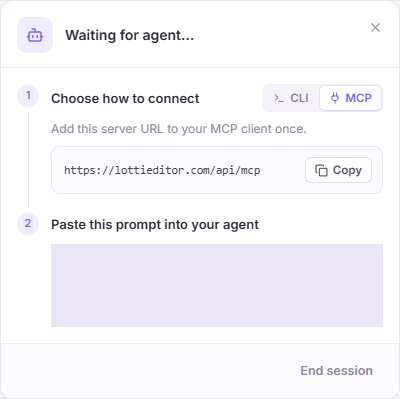
Run the command below in your terminal. Alternatively, merge the downloaded mcp_servers.lottieditor block into your Codex config.toml. The connection uses Streamable HTTP. No Lottieditor provider API key is needed.
codex mcp add lottieditor --url https://lottieditor.com/api/mcp
2. Check the saved configuration
Run codex mcp get lottieditor to check the URL, then start or restart your Codex session. Ask it to list the available Lottieditor tools. Registration is separate from granting access to a project.
3. Pair the animation tab
Open a new Lottieditor project, choose Connect agent, switch to MCP, and paste the pairing prompt into Codex. Keep that browser tab open. A code from a previous tab or session will not reconnect it.
4. Build and inspect the chart
Use the chart prompt below. Ask Codex to grow each bar from the same baseline, then preview the middle of the animation. If the bottom edges move, ask it to adjust y position alongside height. Read the current revision before each change.
5. Save the editable result
Ask for a project export, wait for get_export to complete, and retrieve the file with read_file. JSON, dotLottie, PNG, SVG, GIF, and supported video exports use the editor’s plan checks. A model subscription is separate from Lottieditor Pro.
Try a complete animation
Create a 600 by 600, 2.5-second bar-chart animation at 30 fps. Add a horizontal baseline at y 450. Put rounded bars at x 190, 300, and 410 with final heights 140, 240, and 320 pixels. Grow each bar upward from the baseline over one second, starting at 0, 0.2, and 0.4 seconds. Animate height and y together so the bottoms stay fixed. Use purple, lilac, and green, then hold the completed chart. Keep it decorative: do not invent business metrics. Preview the baseline while the bars grow and save the editable project.Open the editable reference and walkthrough
If the connection fails
- Use the exact HTTPS endpoint ending in /api/mcp, not the /mcp guide URL.
- If tools load but edits fail, generate a fresh pairing code in the current project.
- Keep the editor open. Sleep, tab reloads, or a lost heartbeat can end access.
- Read the latest revision after manual edits or Undo. Avoid sending multiple writes at once.
- A successful connection does not remove export limits. Check the error and your workspace plan.
References and next steps
Setup reviewed September 8, 2026. Official Codex MCP documentation describes client configuration. Lottieditor’s MCP reference covers pairing, tools, and file limits.