 lottieditor
Lottieditor guides
Animate a logo with Claude Code and Lottieditor
Connect Claude Code over HTTP, pair one open project, and animate an imported SVG logo.
Before you start
Use a current Claude Code installation with access to its assistant features, an internet connection, and a browser tab with Lottieditor open. You provide your own assistant account. Browser-only projects can pair without signing in. Exports through MCP require sign-in, including project backups. Animation export permissions also apply.
1. Register the server in your project
Run the command below from the folder where you use Claude Code. Project scope writes .mcp.json in that folder. Merge the downloaded configuration with any existing mcpServers entries instead of replacing them.
claude mcp add --transport http --scope project lottieditor https://lottieditor.com/api/mcp
2. Confirm tool discovery
Start Claude Code in that folder, review the project server prompt if shown, and open /mcp. Enable lottieditor. The server should offer attach_editor and read_project before any project is paired. If it does not appear, restart the client and check the configured URL.
3. Pair an empty browser project
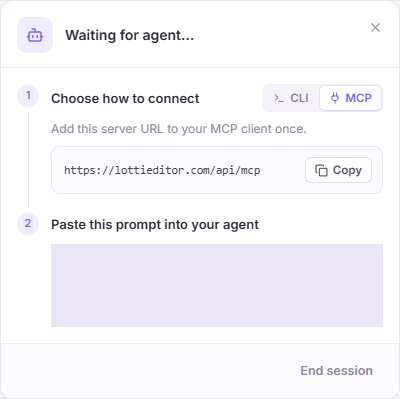
Open Lottieditor, start a project, and choose Connect agent, then MCP. Paste the generated pairing prompt into Claude Code. The code works once and expires after ten minutes. Tool approval may be required by your client settings.
4. Import the logo and animate it
Download the source SVG from the logo example. Give Claude its local path and ask it to upload_file, import_file into the paired project, then stagger the three bars upward. Ask it to preview the result before exporting a .motion project. Downloading or reading a local file uses Claude’s own file tools.
5. Recover from an interrupted edit
If a command times out, ask Claude to read the project before retrying. A retry of the same mutation must use the same request ID; a changed edit needs the new revision. End session in Lottieditor when finished.
Try a complete animation
Create a 600 by 600, two-second animation at 30 fps. Build a geometric logo with three rounded vertical bars centered at x 200, 300, and 400. Use purple, lilac, and green. Make their final heights 180, 280, and 220 pixels, with their bottom edges aligned at y 440. Stagger upward entrances by 0.15 seconds, fading from zero opacity. Finish all motion by 0.9 seconds and hold to the end. Keep every bar a native editable shape. Preview the start, middle, and last frame, then export a project backup.Open the editable reference and walkthrough
If the connection fails
- Use the exact HTTPS endpoint ending in /api/mcp, not the /mcp guide URL.
- If tools load but edits fail, generate a fresh pairing code in the current project.
- Keep the editor open. Sleep, tab reloads, or a lost heartbeat can end access.
- Read the latest revision after manual edits or Undo. Avoid sending multiple writes at once.
- A successful connection does not remove export limits. Check the error and your workspace plan.
References and next steps
Setup reviewed September 8, 2026. Official Claude Code MCP documentation describes client configuration. Lottieditor’s MCP reference covers pairing, tools, and file limits.